
Bareos: Enterprise Backup. 100% Open Source.
Protect your data without vendor lock-in.
Bareos is open-source backup and recovery software for Linux, Windows, macOS, FreeBSD, virtual platforms, databases and other workloads. It supports physical, virtual and hybrid environments while keeping storage targets flexible.
For production use, Bareos Subscriptions provide maintained packages, enterprise plugins and professional support.
Why Bareos
Bareos is built for reliable restores.
You can define what is protected, where data is stored and how long it is kept.
What Bareos supports
Bareos supports a wide range of backup environments without requiring separate tools for each workload.
- Physical servers and endpoints
- Virtual machines and hypervisors such as VMware, Hyper-V and Proxmox VE
- Databases and application data
- Linux, Windows, macOS and FreeBSD systems
- Disk, tape and S3-compatible object storage
- Recovery from single files to full system restore
Bareos backup architecture
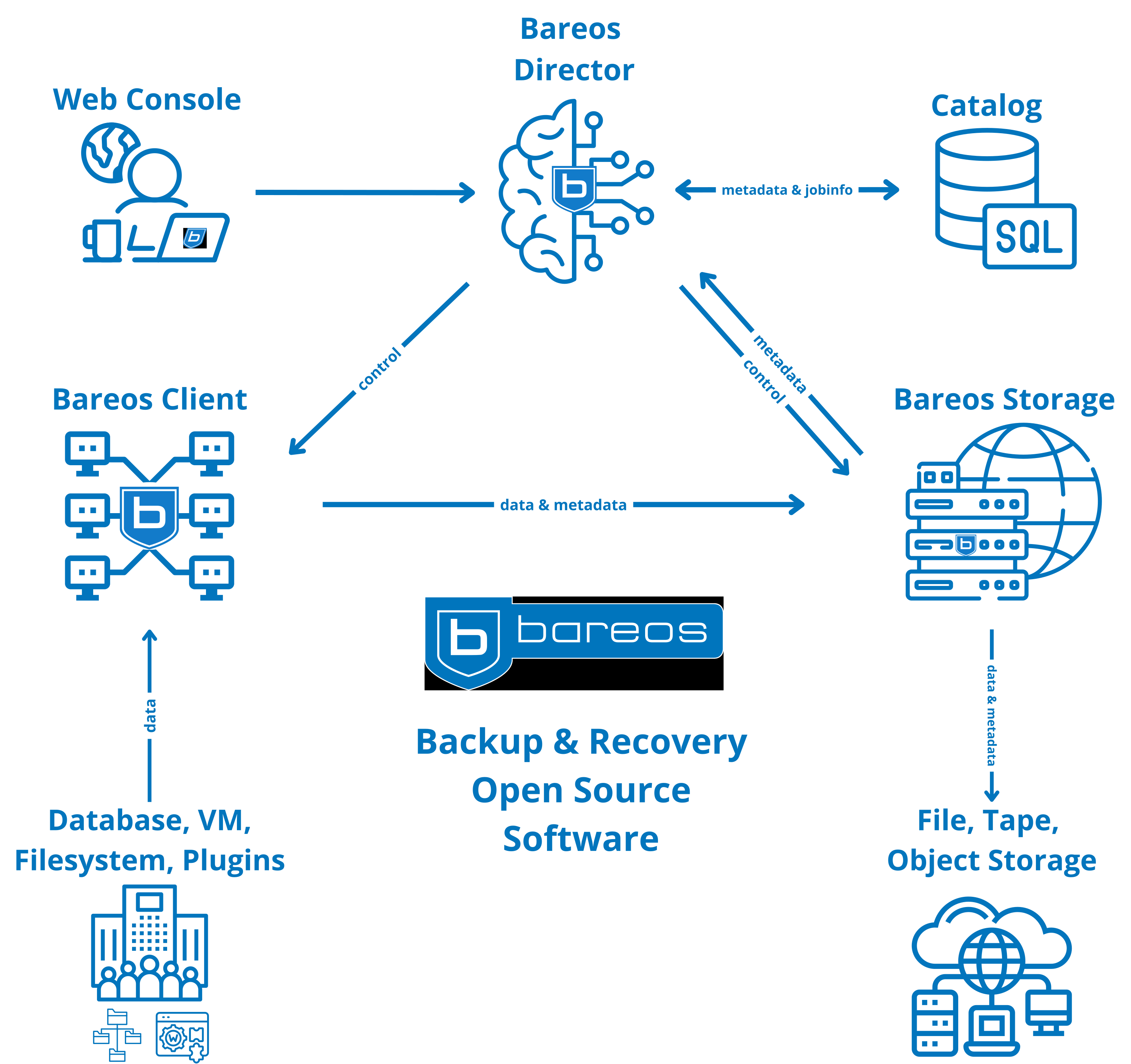
Bareos uses a client-server architecture.
A central Director controls backup and restore jobs. The File Daemon on protected systems provides the data, and the Storage Daemon writes it to the configured storage targets. The WebUI gives operators a central interface for monitoring and restores.
Core Components
Bareos Director
The control plane for scheduling, policies and the backup catalog.
- Defines jobs, schedules, pools and retention
- Keeps the catalog for fast restore selection
- Manages clients and storage resources
Bareos WebUI
The browser-based interface for monitoring, operations and restores.
- Run jobs, monitor status and
view history - Browse the catalog and restore data
- Role-based access (RBAC) for different user groups
Bareos File Daemon
The client on protected systems. It reads data for backup and restores it on request.
- Sends file data and metadata for backup
- Restores files
- Supports plugins
Bareos Storage Daemon
It writes and reads backup data to and from your storage.
- Writes and reads backup data to disk, tape or cloud backends
- Manages volumes, devices and storage resources
- Supports scalable storage setups
The same architecture works across mixed OS environments and can be extended with plugins (VMs, databases, disaster recovery)
while keeping storage targets flexible (disk, tape, cloud).
How to get Bareos
Trial access: evaluate plugins and compatibility in your environment
Subscription: maintained binaries, subscription-only plugins and access to support and services
Open source: source code on GitHub
Used in Professional Environments
Bareos is used in a wide range of environments with different platforms, retention needs and operational requirements. If you want examples, certifications or reference stories, see our references and certifications pages.
Next Steps
Choose the path that fits your situation:
Review pricing and estimate your subscription size
Request trial access to evaluate Bareos 25 in your environment
Download community edition and explore the documentation