'/%3E%3C/svg%3E)



Bareos 25.1 is now available.
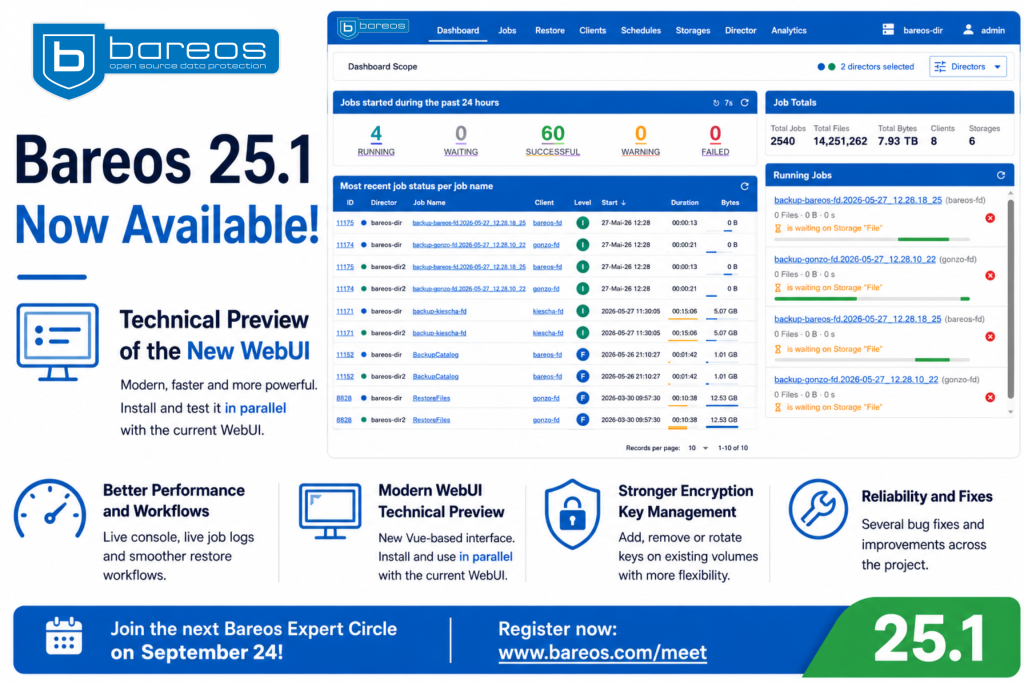
The main feature of this release is a technical preview of the new Vue-based Bareos WebUI. It can be installed and tested alongside the existing WebUI, allowing users to explore the new interface without changing their current production setup.
Bareos 25.1 also introduces more flexible management of LTO hardware encryption keys and includes several bug fixes.
Test the New WebUI Without Replacing the Current One
The new WebUI is available as a separate package and runs in parallel with the classic PHP-based WebUI.
This means administrators can continue using the current interface for their daily work while evaluating the new one separately.
- Classic WebUI:
/bareos-webui - New WebUI preview:
/bareos-webui-new
The new WebUI is currently a technical preview. It is intended for testing, evaluation and feedback. The classic WebUI remains the recommended option for production environments at this stage.
This parallel setup gives users time to become familiar with the new interface and compare both versions based on their own workflows.
Important: The new WebUI does not replace the current WebUI in Bareos 25.1. Both can be installed and used at the same time.
Why Bareos Is Building a New WebUI
The new WebUI is more than a visual redesign.
The current WebUI opens and closes its connection to the Bareos Director for individual commands. The new WebUI keeps this connection active through a proxy service.
In simple terms, the browser can communicate with the Director continuously instead of reconnecting for every action.
This makes the interface more responsive and enables workflows that were difficult to support with the previous technical foundation, including:
- an interactive Bareos console in the browser
- live job information
- smoother restore workflows
- easier switching between multiple Directors
The new architecture also provides a more flexible foundation for future WebUI development.
What Is Already Available
The technical preview already supports several important daily administration tasks:
- dashboard and job overview
- job details
- restore workflows, including plugin restore options
- client, fileset and schedule views
- storage and volume views
- Director status and messages
- interactive console access
- support for multiple Directors on compatible pages
Users can log in with their existing Bareos console credentials. Access continues to depend on the configured Console resources and ACLs in the Bareos Director.
Some workflows are presented differently from the classic WebUI, and not every feature has been transferred in the same way. The preview should therefore be tested alongside the existing interface.
Improvements for Daily Administration
The new WebUI also includes several practical improvements for administrators.
Improved restore workflow
The new interface keeps the Director connection active during a session. This makes interactive restore operations easier and avoids losing the current context between commands.
The restore browser can also present different versions of backed-up files in one place, helping users select the required version more easily.
Live job information
Administrators can follow job activity and logs more directly instead of repeatedly refreshing the page or reopening views.
Multiple Director support
The new WebUI can connect to more than one Bareos Director. Users can switch between configured Directors or view combined information where the page supports it.
This can be useful for organisations managing several Bareos environments or locations.
Better access from different devices
The interface has been designed with improved mobile usability and more modern browser behaviour in mind.
Additional interface improvements
Other available improvements include:
- schedule previews
- tape autochanger information
- tape encryption status
- relative timestamps
- language switching after login
- dark mode
- redesigned analytics and subscription views
These features are useful, but the main change is the new technical foundation and the workflows it enables.
Add, Remove or Rotate Encryption Keys on Existing Volumes
Bareos 25.1 also improves the management of LTO hardware encryption.
Previously, hardware encryption had to be selected when a volume was labelled. With Bareos 25.1, an encryption key can now be added to an existing volume using the update volume command.
Subsequent backups written to that volume can then use encryption without requiring the volume to be relabelled.
Administrators can also:
- remove an encryption key
- replace an existing key with a new one
Encryption keys can be removed or rotated when the volume has the status Purged.
This provides more flexibility when encryption requirements change or existing tape media need to be reused under a new key policy.
Bug Fixes and Additional Improvements
Bareos 25.1 also includes several bug fixes and smaller improvements.
For the full technical list, please refer to the Bareos 25.1 release notes.
Try the New WebUI
The new WebUI is installed separately through the bareos-webui-new package.
Detailed installation, configuration and multi-Director instructions are available in the documentation:
Read the Bareos WebUI Vue documentation
You can also watch Philipp Storz demonstrate the new WebUI and explain the ideas behind it:
Watch the new Bareos WebUI preview
Discuss the New WebUI at the Next Expert Circle
The new WebUI will also be one of the main topics at the next Bareos Expert Circle on September 24, 2026.
Philipp Storz will share the latest news about Bareos 26 and the further development of the new WebUI. Participants will also be able to ask questions and share their feedback.