


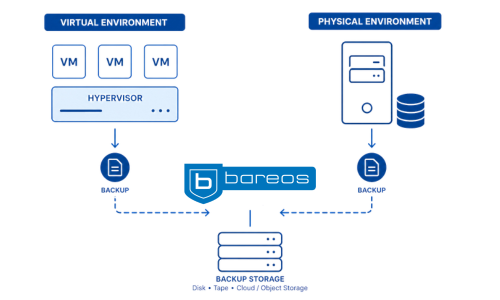
Backing up physical servers is different from backing up virtual ones. Physical servers are usually backed up through the operating system or the storage system. With virtual machines, the hypervisor adds another layer that affects how backups are made, changes are tracked and restores work. The key question is not just if backup is possible. What matters is how each platform manages snapshots, tracks changes, handles metadata and restores data.
VM backup often looks simple until restore is needed. In practice, the failure is not always the backup job itself. Sometimes the wrong data was excluded, sometimes retention was configured incorrectly or the restore is technically possible, but slow, manual or uncertain. And in many cases, the most common root cause is still human error rather than a dramatic disaster.
Bareos handles this with plugins for VMware, Hyper-V and Proxmox.
VMware Plugin
Bareos uses the VMware vStorage API to create a snapshot during backup and uses Changed Block Tracking, so only used and changed blocks are transferred. This makes backups more efficient and means you do not have to turn off the VM. Bareos can restore data to VMware storage by either overwriting an existing VM or creating a new one with a different name. This means Bareos supports the full VM workflow.
If you want to configure the VMware Plugin in your environment, please see the Bareos documentation for setup details.
Proxmox Plugin
The Proxmox Plugin lets you back up VM guests and container guests on Proxmox VE without needing an agent. It supports full backups, and you can restore either to a new Proxmox guest or to a local vzdump dump file for later recovery using the Proxmox GUI.
If you want to configure the Proxmox Plugin in your environment, please see the Bareos documentation for setup details.
Hyper-V Plugin
The Hyper-V Plugin uses a workflow designed for Hyper-V and creates a checkpoint during backup. This gives Bareos a way to protect virtual machines that fits Microsoft Hyper-V environments. The Hyper-V plugin supports RCT (Resilient Change Tracking), a technology similar to VMware’s CBT.
If you want to configure the Hyper-V Plugin in your environment, please see the Bareos documentation for setup details.
All three platforms run virtual machines, but each one handles backup differently. VMware uses snapshots and Changed Block Tracking. Proxmox plugin provides agentless full backups and can restore to a new guest or a vzdump file. Hyper-V uses a workflow based on checkpoints and Resilient Change Tracking. The real difference is how backup and restore actually work.
Bareos also includes plugins for databases, LDAP, RCT (Resilient Change Tracking), Linux and Windows disaster recovery, tape features and Python-based extensions. That is useful because different workloads need different backup logic.
Read more about Bareos plugins: docs.bareos.org
Bareos supported plugins page: https://www.bareos.com/plugins/